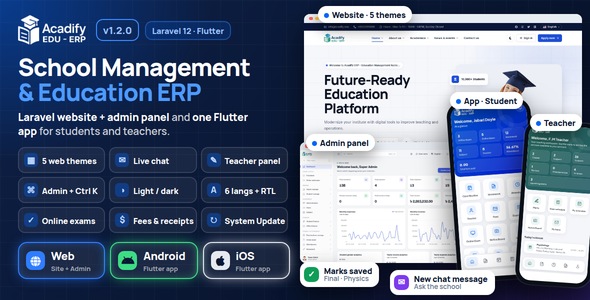
Acadify EDU ERP – School Management System (Website, Admin Panel & Student/Teacher App)
▶ Live Demo & Documentation
The demo sign-in page has one-click buttons for the demo accounts, and the app shows Student and Teacher demo cards when it is
connected to the demo. These accounts and the sample school data exist on the demo site only: a fresh installation starts empty,
with the one administrator account you create in the installer.
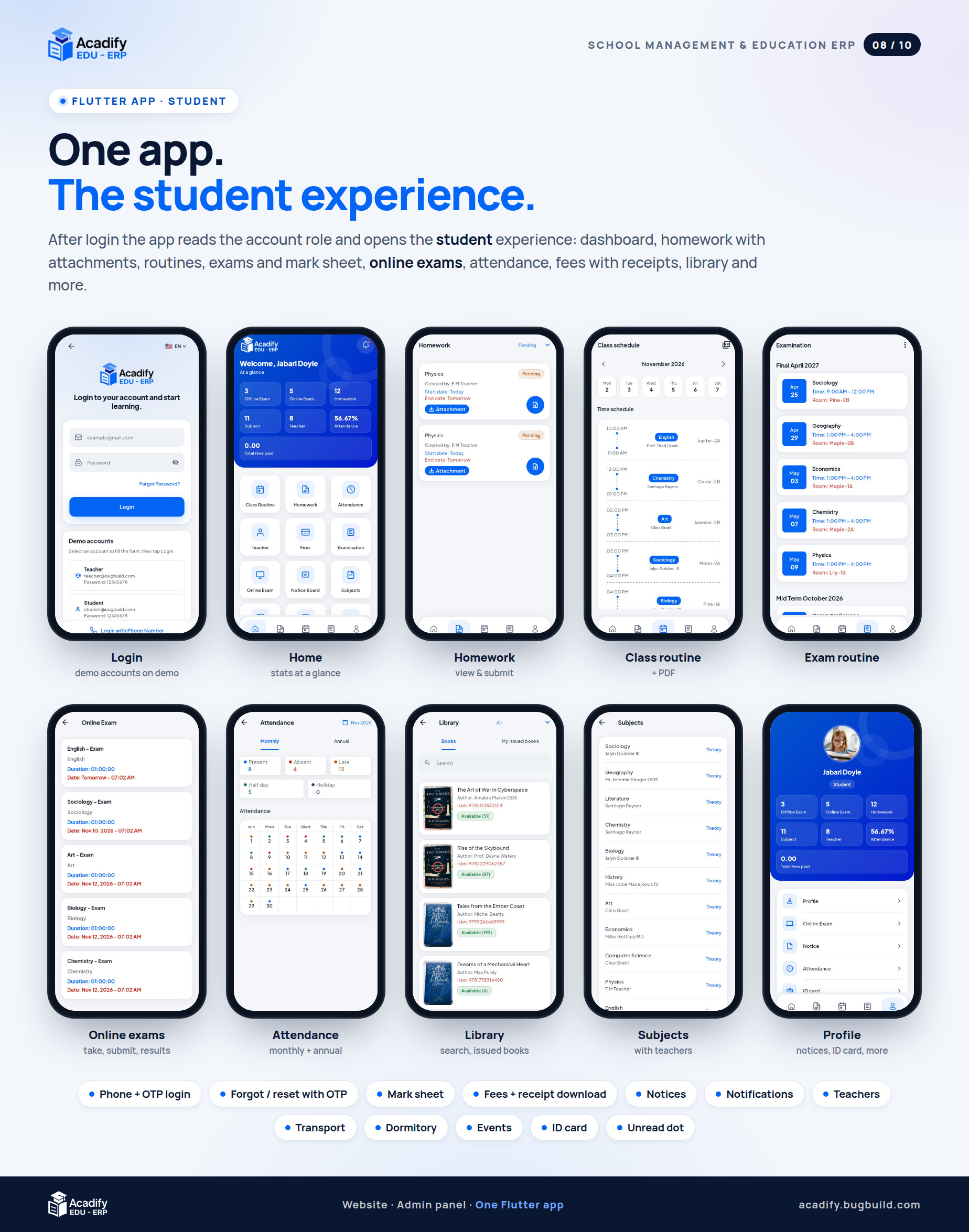
One app, two roles. There is a single APK — install it once and sign in as a student or a teacher. The app
reads the account’s role after login and opens the student or the teacher experience. Parents and
administrators use the website. iOS is supported; build it with Xcode from the Flutter source included in the package.
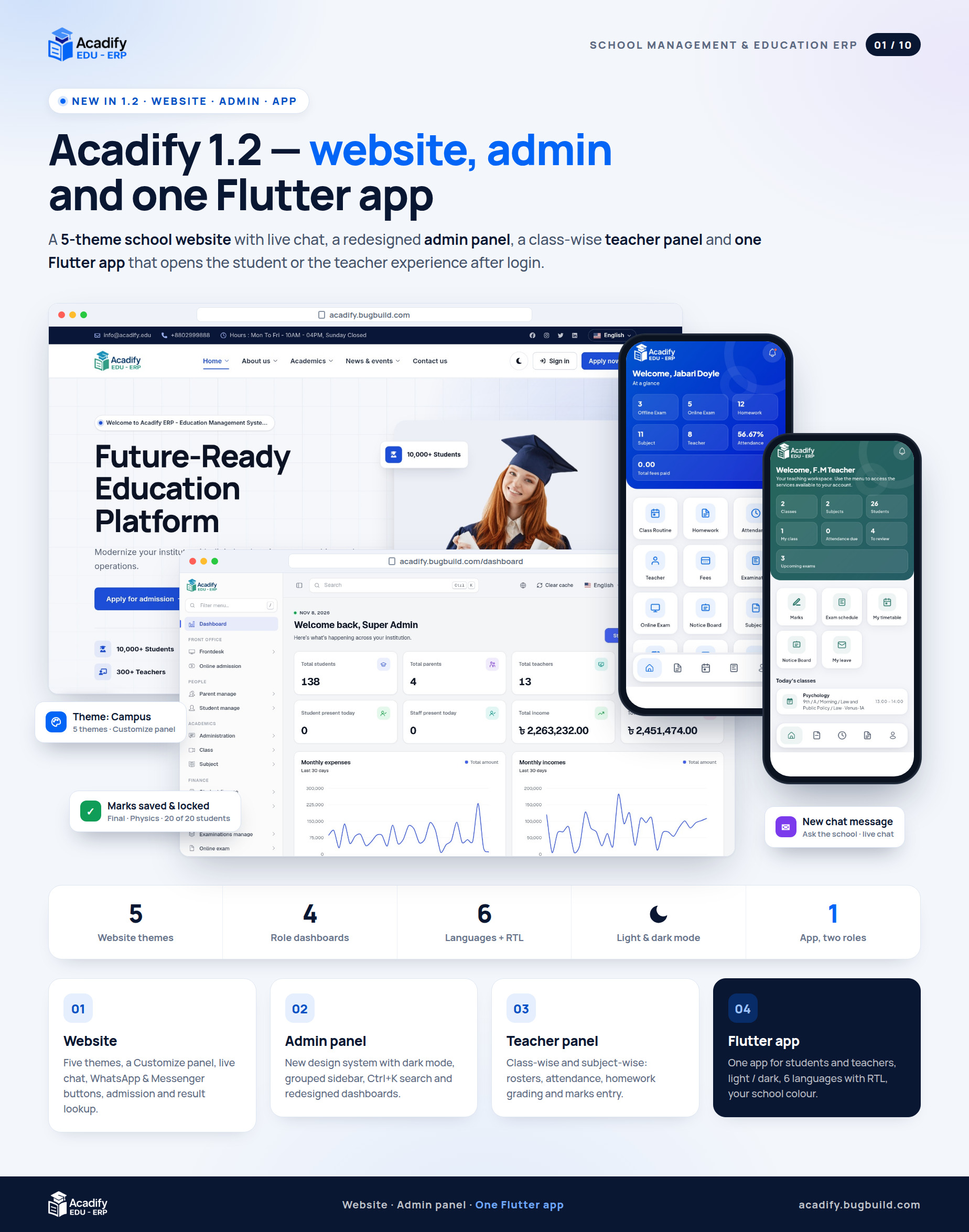
What’s New in 1.2
- The full website and admin panel are now included. Version 1.0.0 of this item contained only the student app. Version 1.2.0 ships the complete Laravel school website, admin panel, teacher/student/parent portals and API together with the Flutter app.
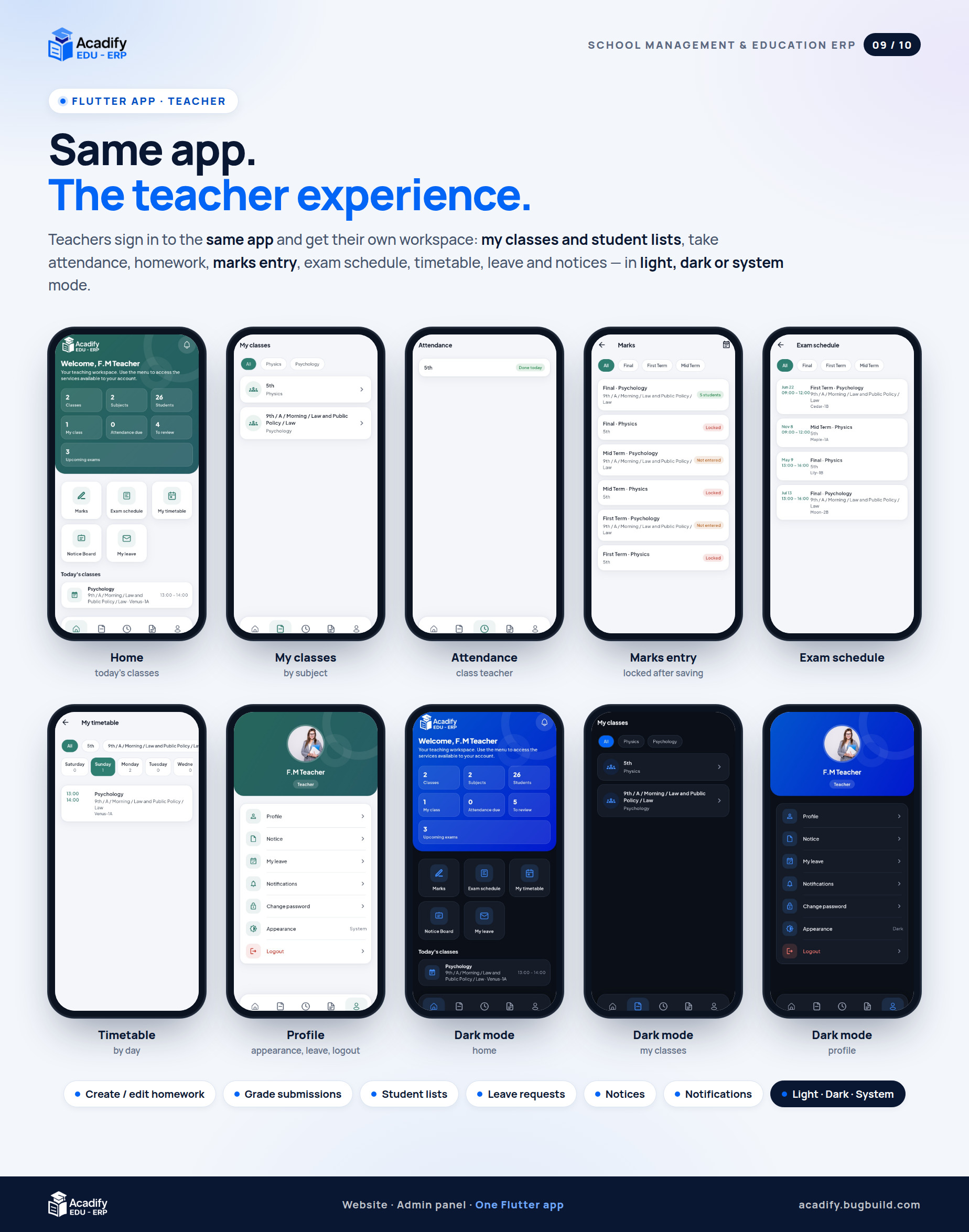
- The app was updated — a new design with light and dark mode, the school’s brand colour taken from the website, and a brand-new teacher experience next to the student experience.
- Five website themes — Classic, Campus, Scholar, Bright and Nova — with a Customize panel for colour, font, corners, text size and dark mode.
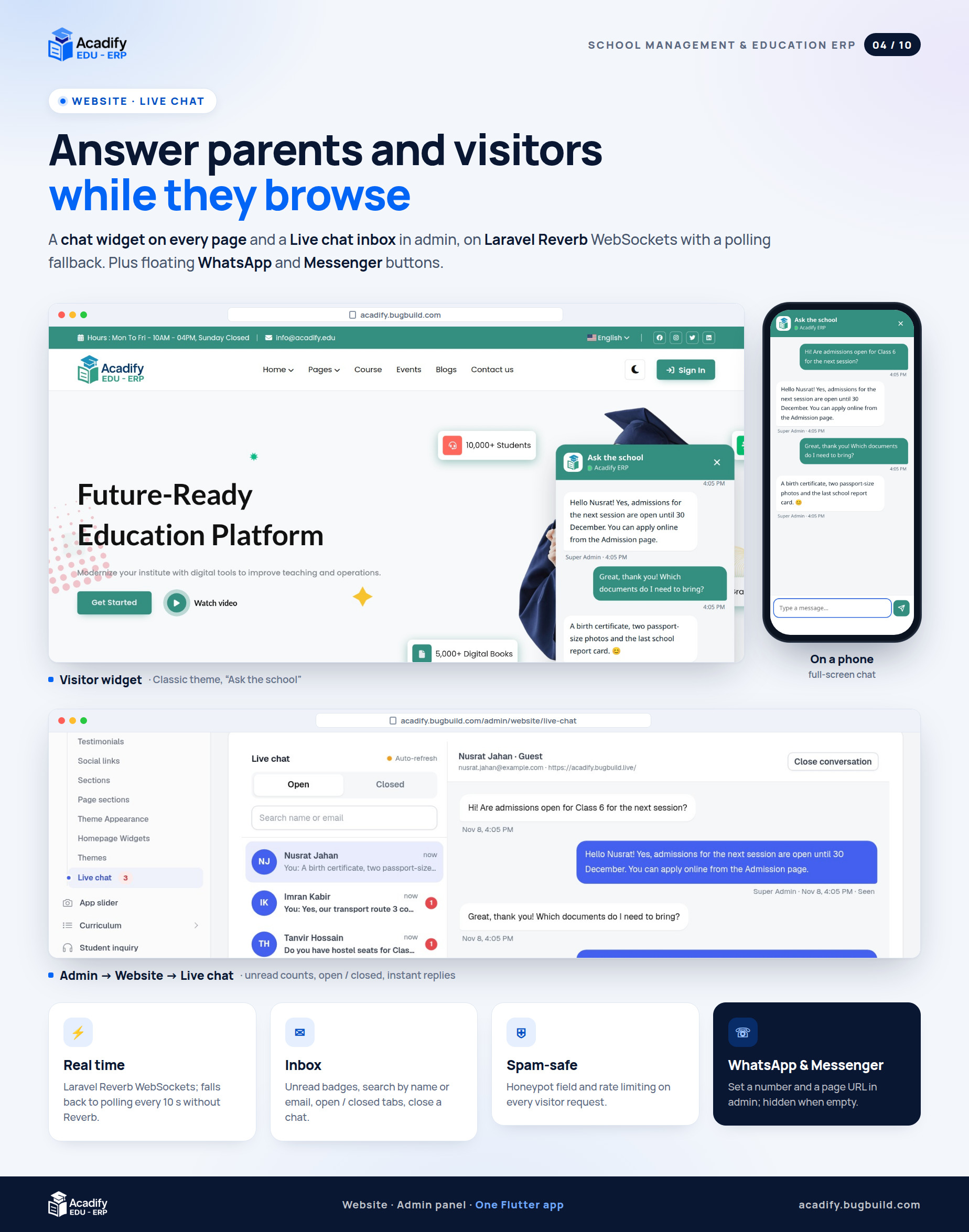
- Live chat on the website over Laravel Reverb, plus floating WhatsApp and Facebook buttons.
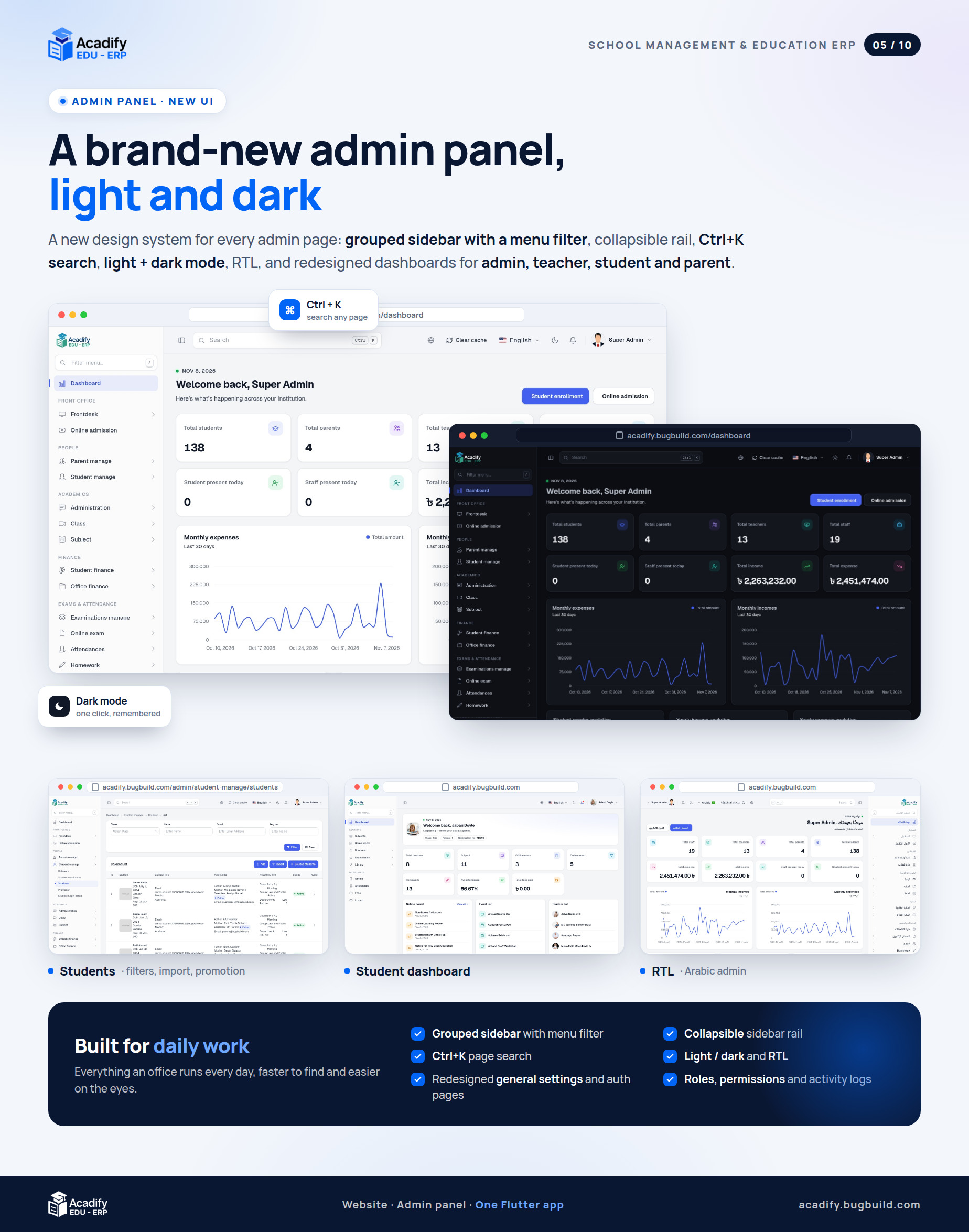
- Redesigned admin panel — new dashboards, grouped sidebar with menu filter, Ctrl+K search, light and dark mode.
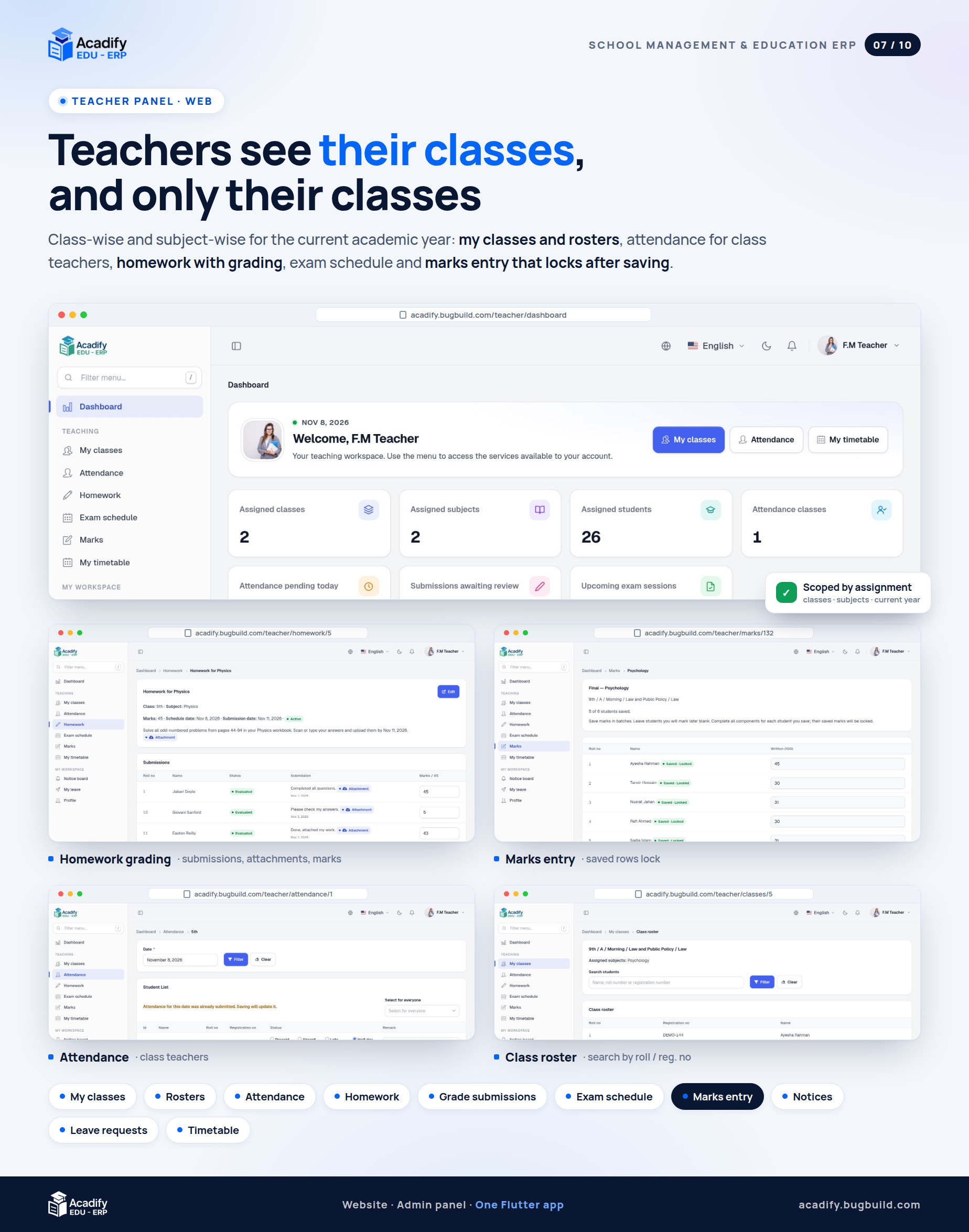
- Teacher panel on the website, limited to each teacher’s own classes and subjects, with class teachers for daily attendance.
- System Update — install future releases from the admin panel.
Acadify EDU ERP is a school management system and education ERP for schools, colleges, coaching centres,
kindergartens and academies.
From one Laravel 12 backend you get a public school website with five themes, a redesigned
admin panel, web portals for teachers, students and parents, and one Flutter mobile app
for students and teachers. Everything ships together in the main download and connects to a single backend and database over a
JWT-secured REST API.
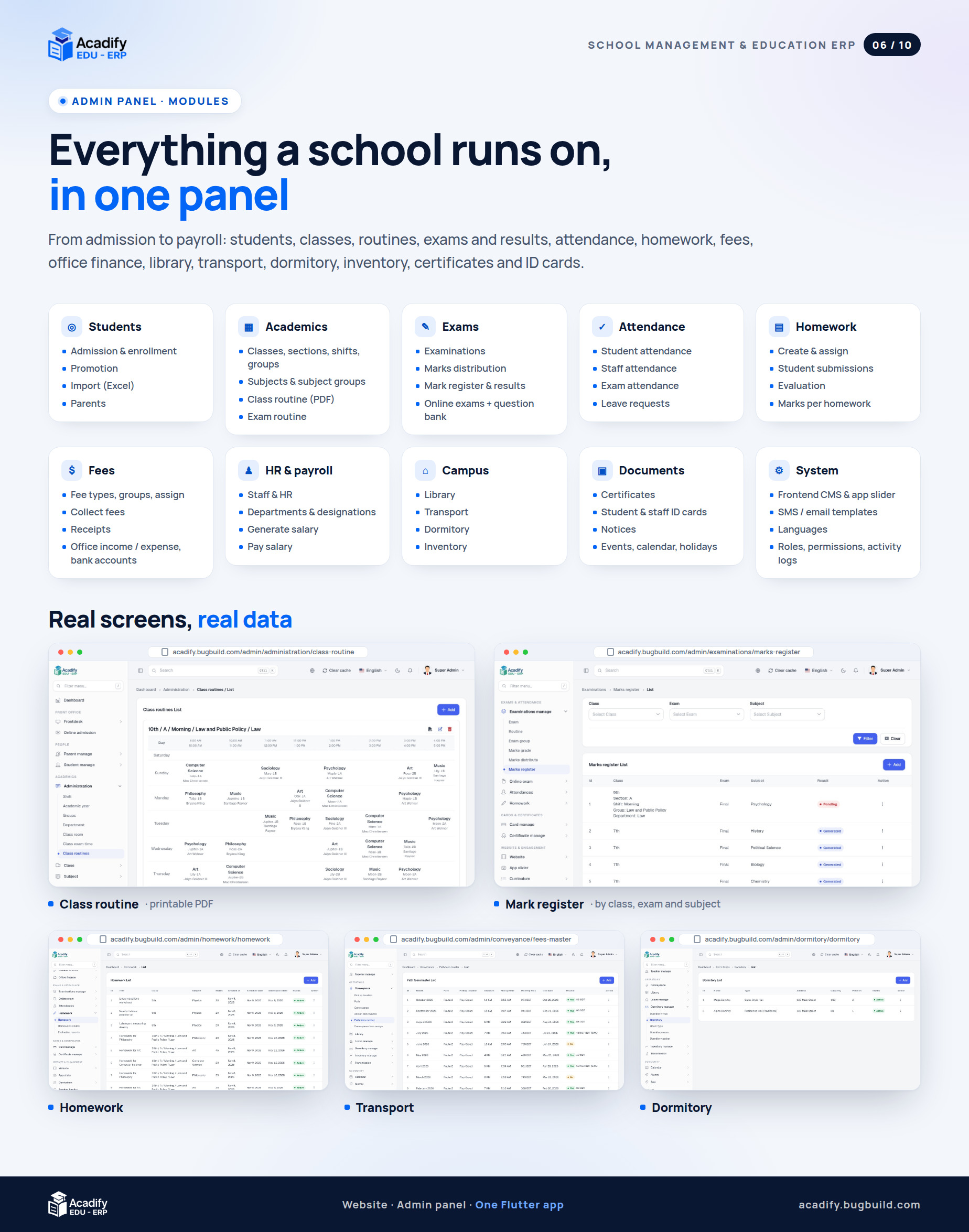
Run admissions, classes, subjects, routines, exams and results, attendance, homework, fees and office finance, library, transport,
dormitory, inventory, certificates and ID cards from one place, and publish notices, events, blogs and courses on your website.
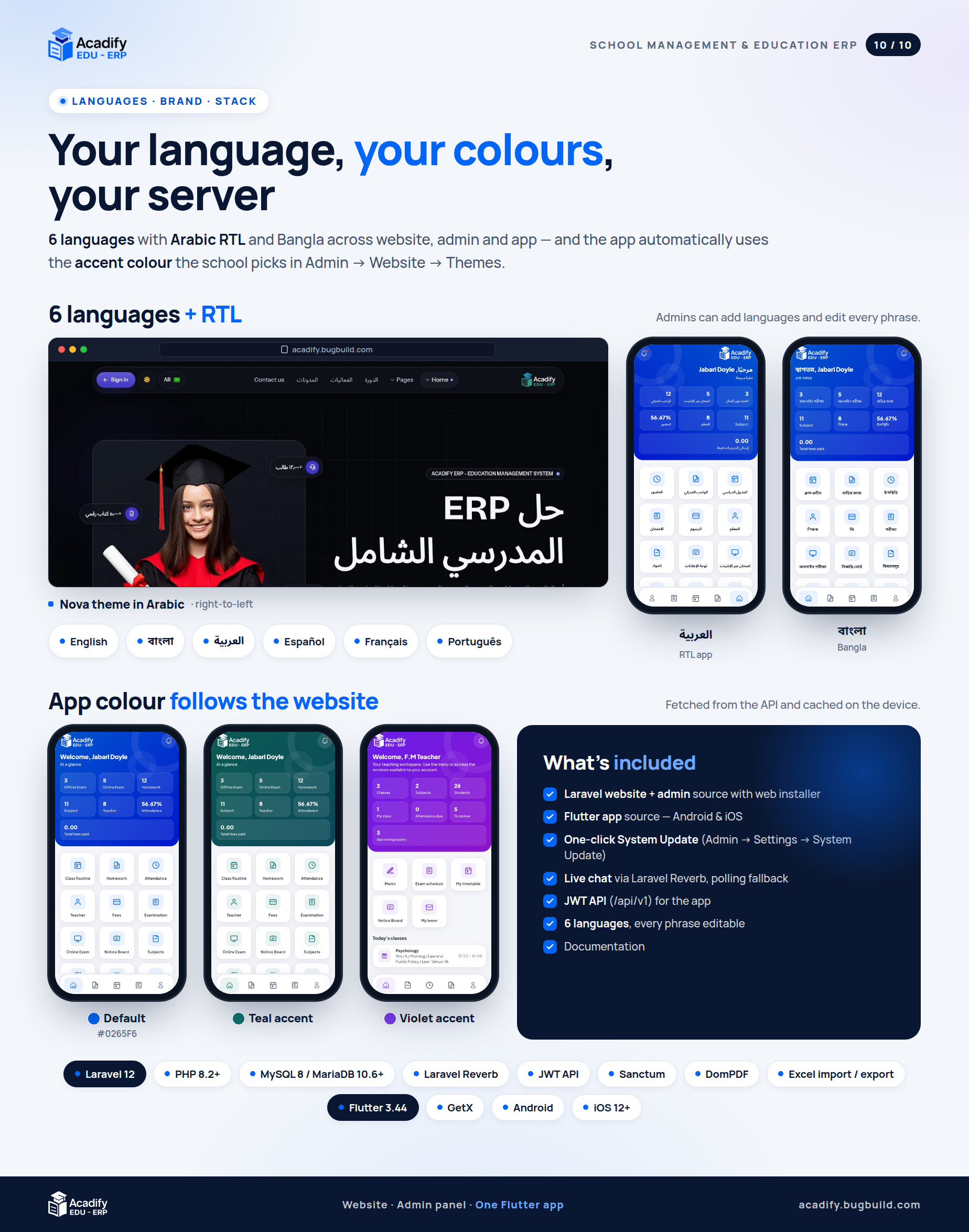
The platform ships with six languages — English, Bangla, Arabic (right-to-left), Spanish, French and Portuguese. Add any other
language and edit every phrase of the website, the admin panel and the app from the admin panel.
What You Get
- Laravel Web Application — public school website (5 themes), admin panel, teacher panel, student and parent portals, and the mobile REST API.
- Mobile App (Flutter) — one source project for Android and iOS. After login it opens the student or the teacher experience, so you build and publish one app.
- Web installer — enter the database and administrator details in the browser; it writes the database settings, creates the tables and default data and makes your administrator account.
- Full source code for the backend and the app, and offline HTML and PDF documentation — all inside the main download.
Important Note About Third-Party Service Costs
Any costs related to hosting, domains, server infrastructure, email/SMTP services, SMS gateways, payment gateways (Stripe),
Google reCAPTCHA, Apple and Google developer accounts for publishing the app, or any other third-party service are
not included in the item price. Buyers must sign up for and configure these services separately based on their
own project requirements. You also generate your own application keys and enter your own credentials during setup. Using these
services may involve additional costs.
Application Features
Website — Five Themes (new in 1.2)
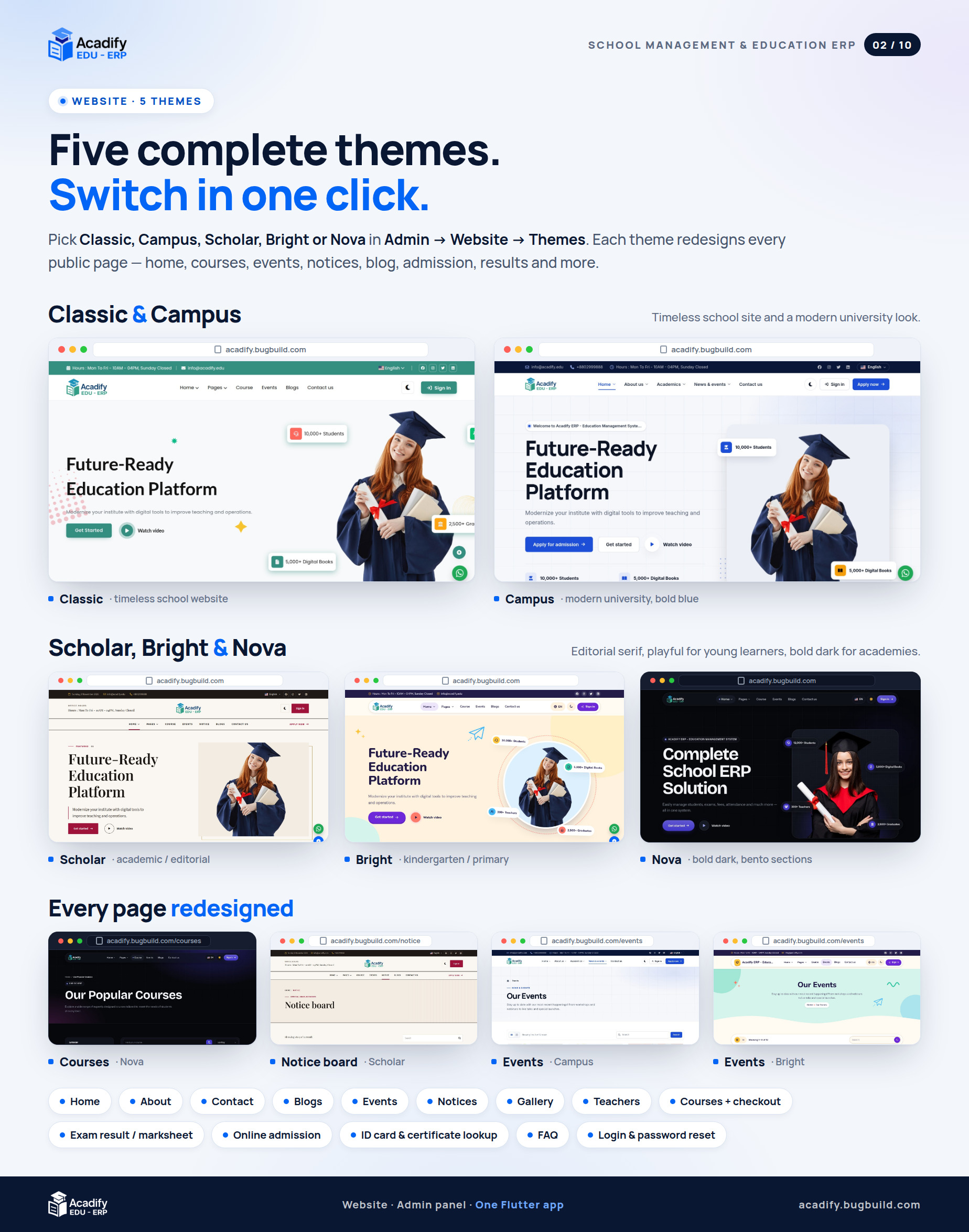
- Five complete themes, chosen in Website → Themes: Classic (timeless school site), Campus (modern university), Scholar (academic and editorial), Bright (playful, for kindergartens and primary schools) and Nova (bold and dark, for coding schools and online academies)
- Every theme redesigns every public page: home (2 home layouts), about, contact, blogs, events, notices, gallery, teachers, courses with details and checkout, exam result and marksheet lookup, online admission form, ID card and certificate lookup, FAQ, privacy, terms, login and password reset
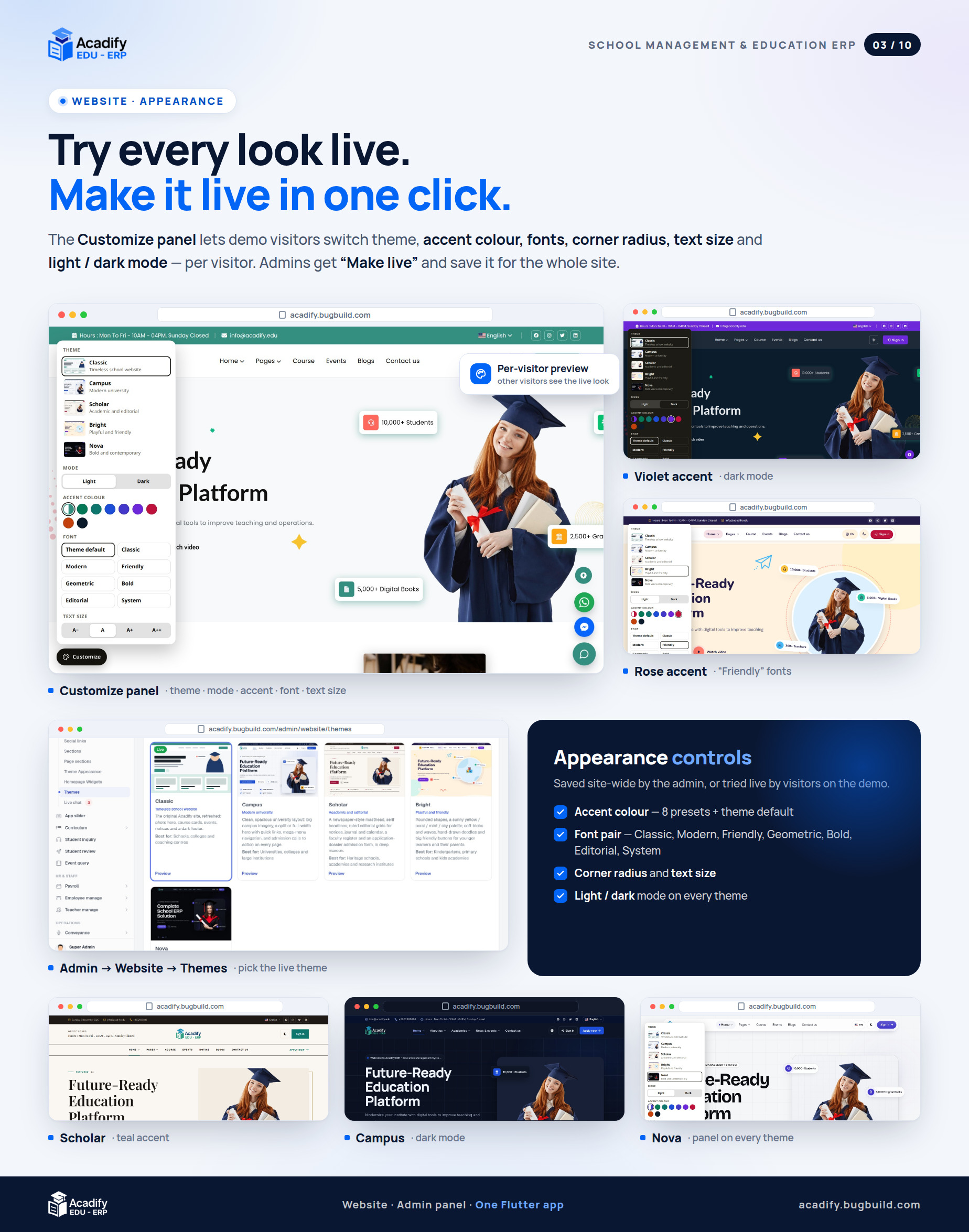
- Appearance controls: accent colour, font pair, corner radius, text size and light/dark mode, saved for the whole site by the admin
- Customize panel: on the demo every visitor can try themes, colours, fonts, corners and dark mode live; on your site administrators preview and press “Make live”
- All content is managed from the admin panel: sliders, sections, page sections, homepage widgets, blogs, events, notices, gallery and courses
Live Chat, WhatsApp and Facebook (new in 1.2)
- Chat widget on every page of the website; guests leave a name and email, signed-in users are recognised
- Admin Live chat inbox with unread counts and open / closed conversations
- Real time over Laravel Reverb (WebSockets); without a Reverb server the chat still works by refreshing every 10 seconds
- Spam protection: honeypot field and rate limiting
- Floating WhatsApp and Facebook buttons — set a number and a page URL in the admin panel; each button is hidden when empty
Admin Panel (redesigned in 1.2)
- New design system: modern dashboard, grouped sidebar with a menu filter, collapsible sidebar, Ctrl+K search, light and dark mode, right-to-left support
- Redesigned dashboards for admins, teachers, students and parents
- Students (admission, enrollment, promotion, import), parents, staff and HR, payroll, departments and designations
- Classes, sections, shifts and groups, subjects and subject groups, class routine (PDF), exam routine
- Examinations, marks distribution and mark register, results, online exams (question bank, assign, results)
- Student, staff and exam attendance, homework, leave
- Fees (assign, collect, receipts) and office finance (income, expenses, bank accounts)
- Library, transport, dormitory, inventory, certificates and ID cards
- Notices, events, calendar and holidays, SMS and email templates
- Website CMS, app slider, languages, roles and permissions, activity logs
Teacher Panel — Class-Wise and Subject-Wise (new in 1.2)
- Teachers see only the classes and subjects assigned to them for the current academic year
- My classes with student lists
- Daily attendance for class teachers
- Homework: create, edit and grade submissions
- Exam schedule and marks entry (marks lock after saving)
- Notices, leave requests and timetable
Mobile App — One Flutter App for Students and Teachers (updated in 1.2)
One app. After login it reads the account’s role and opens the matching experience. New design with light, dark and system mode;
the app uses the brand colour the school picks on the website; six languages including Bangla and Arabic (right-to-left).
Login
- Email and password, or phone number and one-time code
- Forgot and reset password with a one-time code
Student
- Dashboard, homework (view and submit with an attachment)
- Class routine (and PDF), exam routine, assigned exams and mark sheet
- Online exams: take, submit and see results
- Attendance (monthly and yearly), fees with receipt download
- Notices, subjects, teachers, library (search, issued books), transport, dormitory, events and ID card
- Notifications that open the right screen, with an unread dot
Teacher (new)
- Dashboard, my classes and student lists
- Take attendance (class teachers)
- Homework: create, edit and grade
- Marks entry, exam schedule and timetable
- Leave, notices, notifications and profile
System Update (new in 1.2)
- Install future releases from Settings → System Update: upload the new release as a ZIP, or copy the files by FTP and press “Finalize manual update”
- Or run
php artisan acadify:upgrade over SSH
- Your
.env, storage, vendor and public/uploads are never overwritten
Technologies Used
- Laravel 12 (PHP 8.2+)
- MySQL 8 or MariaDB 10.6+
- REST API secured with JWT (
/api/v1), plus Laravel Sanctum and Fortify
- Laravel Reverb for the real-time chat (WebSockets)
- Laravel Modules (nwidart/laravel-modules) — Attendance, Installer, Leave and Section modules
- DomPDF (routines, ID cards, certificates, receipts), Intervention Image, Laravel Excel (imports and exports)
- Flutter 3.44 with GetX for state management
System Requirements
Web Server Requirements
- PHP 8.2 or higher
- MySQL 8.0 or higher, or MariaDB 10.6 or higher
- Apache or Nginx with the document root pointed to the
public/ folder
- SSH or terminal access (cPanel Terminal is enough) for a few
php artisan commands
allow_url_fopen on and date.timezone set in php.ini- A cron entry for the Laravel scheduler
- Optional, for real-time chat: a process manager such as Supervisor to keep
php artisan reverb:start running
Required PHP Extensions
- BCMath
- Ctype
- cURL
- Fileinfo
- GD
- JSON
- Mbstring
- MySQLi and PDO MySQL
- OpenSSL
- Tokenizer
- XML
- Zip
Mobile App Requirements
- Flutter SDK 3.44 on the stable channel
- Android Studio or VS Code with the Flutter plugin
- Xcode, required only for iOS builds (iOS 12.0 or later)
- Android device/emulator or iOS device/simulator for testing
What Is Included in the Download
- WebSourceCode/ — the complete Laravel project with a clean
.env.example (demo mode off, all keys blank)
- AppSourceCode/ — the complete Flutter project (one app for students and teachers). No signing keys are included; you create your own
- documentation/ — offline HTML documentation in English (quick start, overview, setup and configuration, admin guide, mobile app) and PDF copies
Demo photos and sample content are for the live demo only. A fresh installation contains no students, teachers, classes or demo users.
Installation Summary
- Upload
WebSourceCode and point your domain’s document root to its public/ folder.
- Run
cp .env.example .env, php artisan key:generate and php artisan jwt:secret.
- Create an empty MySQL database and open your site. The web installer at
/install checks the server, asks for the database and your administrator’s name, email and password, and creates the tables and default data.
- Run
php artisan storage:link and make storage/, bootstrap/cache/ and public/ writable.
- Add the cron entry:
* * * * * php /path/to/artisan schedule:run >> /dev/null 2>&1
- Optional: start Laravel Reverb for real-time chat (the documentation includes the Supervisor and Nginx settings).
- Mobile app: set your website address in
lib/utils/end_points.dart (or pass --dart-define=API_BASE_URL=...), change the package ID, the app name and icons, then build with flutter build apk --release or flutter build appbundle, or archive in Xcode for iOS.
Upgrading from 1.0.0: copy the 1.2.0 files over your site (keep .env, storage and public/uploads) and run php artisan acadify:upgrade. Every step is explained in the included documentation.
Support
Item support is provided by BugBuild Lab through the CodeCanyon item comments and
[email protected], following the
Envato item support policy.
Support covers questions about the item’s features, help with reported bugs, and help with the
included third-party assets. It does not include custom development, installation on your server or
work for third-party services you connect.
Changelog
Version 1.2.0 (8 November 2026)
- Website and admin panel included — the Laravel website, admin panel, portals and API now ship in this item together with the Flutter app
- Teacher experience in the app and a teacher web panel scoped by class and subject, with class teachers for daily attendance
- Five website themes — Classic, Campus, Scholar, Bright and Nova — with the Customize panel and an admin Themes page
- Live chat over Laravel Reverb, with WhatsApp and Facebook buttons
- Redesigned admin panel — design system, dark mode, new admin, teacher, student and parent dashboards
- System Update — install new releases from the admin panel or with
php artisan acadify:upgrade
- App redesign — the app colour follows the website brand colour; app name “Acadify” on all platforms
- Fixed: existing installs get the teacher permissions through a migration; per-user permissions survive profile edits
- Fixed: app crash when signing in again, dates with Bengali digits rejected by the API, notification list crash, marks entered on the website not opening in the app, blank timetable filters, library screen crash
- Fixed: password reset flow, editing a class group, creating attendance, and PDFs (routine, ID card, certificate) that fetched their own images over HTTP
- Security: students and parents can no longer call admin AJAX endpoints; path traversal in the language editor fixed
Version 1.0.0
- Initial release (student app)